


KSAT 12 News
4.61.83K Reviews
App Specs
- Version
- 2400228.0.556
- Updated On
- License
- Free
- Downloads
- 100,000+
- Developer
- Graham Media Group
- Categories
- News & Magazines
- Platform
- Android
Screenshots

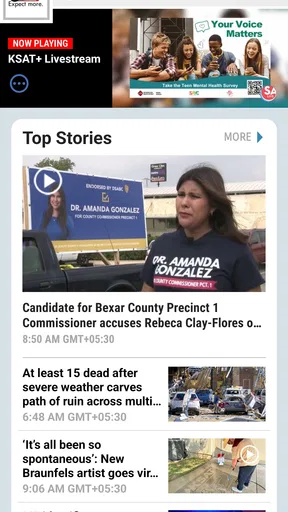

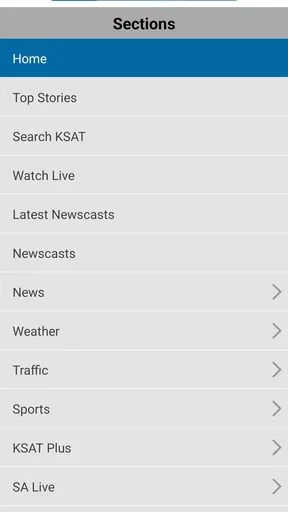
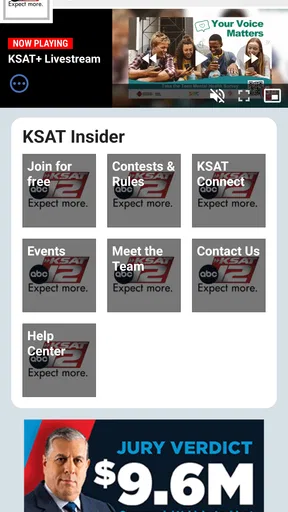
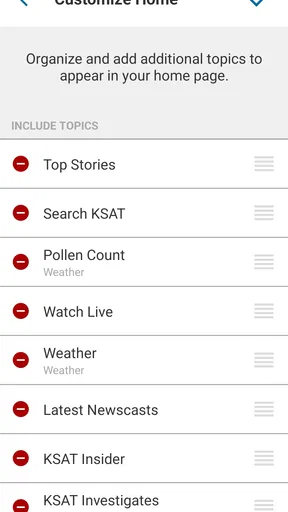

 Analysis by AppCompare
I tend to give local-news apps a simple test: after the first few days of tapping around, do they still help me make better everyday decisions, or do they become another source of notifications I ignore? With KSAT 12 News, the strongest case for keeping it is its San Antonio focus. It’s a free news app from Graham Media Group, and its mix of local reporting, sports and weather makes most sense when those subjects are already part of your routine.
Who gets the most from a local-first feed
If you live in or regularly follow San Antonio, local coverage can fill a gap that national news apps leave open. A national outlet may be better for broad context or a range of viewpoints, while a station app is more useful when you want to check what is happening close to home. I would treat this as a companion to broader sources, not as a complete replacement for them.
That distinction matters if you have moved away but still care about the city, or if family, work or travel keeps you connected to it. A quick scan can help you spot stories worth following without having to search across several sites. If San Antonio is not relevant to your daily life, though, the app’s local emphasis is a reason to skip it rather than a flaw to work around.
First-week appeal: a quick way into local coverage
If you're anything like me, staying updated with local news is a big deal. Whether it's catching up on neighborhood events or keeping an eye on breaking news, having a reliable source is essential. That's where the KSAT 12 News app comes into play. Let's dive into what makes this app tick and why it might just become your go-to news source.
First Impressions: A User-Friendly Experience
When I first installed the KSAT 12 News app, I was immediately struck by its clean and intuitive design. From the moment you open it, everything feels just right. The layout is straightforward, making it super easy to navigate through various sections. Whether you're tech-savvy or a bit more old-school, this app is designed to cater to everyone.
What I love most is the customizable menu. You can tailor it to show the topics that matter most to you — whether that's weather updates, sports, or community news. It's like having a personal news assistant right in your pocket!
A calmer notification routine
Alerts are most valuable when I decide what deserves an interruption. A practical way to use a local-news app is to keep urgent notices for situations that could change a plan, then open the app intentionally for ordinary headlines. If every category competes for attention, the phone can start to feel like a running ticker rather than a useful news source. I’d review notification choices after the first few days and keep only the ones that genuinely help me act.
Worth Reading Before You Choose

EA SPORTS FC Mobile 26 Is a Bigger Football Game, but It Takes Time

Flipboard Shows What News Apps Must Do Beyond the Feed

Switching to Android Auto Means Rethinking Your Driving Routine

Google Calendar Makes a Crowded Week Easier to Manage

Ludo King Makes the Most of the Minutes Between Plans

Baby Panda World Brings Quick Play to Modern Phones, but Its Game Library Feels Busy
That approach is especially useful during a busy commute or a day full of appointments. A warning about conditions may be worth seeing immediately; a story that can wait is better read when I have time to understand it. I would not assume every alert needs the same response, and I would use another trusted source when a decision has serious consequences.
Stay Informed with Real-Time Alerts
One of the standout features of the app is its real-time alert system. Imagine this: You're out and about, and you get a notification about a traffic jam on your usual route home. With the app's push notifications, you're always in the loop, which is incredibly handy for anyone with a busy lifestyle.
And it’s not just about traffic. The app keeps you updated on everything from severe weather warnings to breaking news stories. It’s like having a little newsroom buzzing in your pocket, making sure you never miss a beat.
Month-to-month value: build a small, repeatable habit
The app earns a place on my phone less through constant browsing than through a few useful check-ins. I’d open it when planning the day, then return when a local story affects a route, school activity, event or weekend plan. This is a more sustainable rhythm than trying to follow every headline as it appears. A short, deliberate visit can be enough to decide whether something needs a closer read.
For example, before leaving for an appointment, I might scan local headlines and weather coverage, then check back later if a developing story changes the situation. The point is not to predict what the app will contain, but to use its local reporting as a starting point and confirm important details before acting. For time-sensitive travel decisions, a dedicated navigation service may be more direct than a news app.
In-Depth News Coverage
We all know that not all news is created equal. Sometimes, you need more than just a headline. Thankfully, this app offers in-depth articles and video reports that dive deeper into the stories that matter. The journalists behind these reports do an excellent job of presenting well-researched pieces.
Plus, if you're a visual learner, you’ll appreciate the high-quality video content. The app's multimedia approach ensures you get the full picture, literally and figuratively.
When a story needs more than a quick scan
I find local coverage most useful when I move from a headline to the details: what happened, where it matters, and what is still developing. Reading or watching a report gives more context than a notification can, while a headline alone can leave too much room for assumptions. For complicated issues, I would compare coverage with other reputable reporting rather than treating one app as the final word.
Video is a helpful option when I have a quiet moment, but it is not always the best format. If I’m in a public place, short on time or trying to avoid audio, text is more practical. That makes the app easier to fit into different parts of the day, even though people who want a text-only experience may prefer a publication built around written articles.
Weather Updates: Because We All Need to Know
Living in a place where the weather can change on a dime, having quick access to reliable forecasts is crucial. The KSAT 12 News app has a dedicated weather section that delivers accurate and up-to-date information. From daily forecasts to severe weather alerts, this app ensures you're never caught off guard by Mother Nature.
- Hourly and weekly forecasts
- Radar maps to track storms
- Weather-related news stories
Whether you're planning a weekend getaway or just want to know if you need an umbrella, this section has got you covered.
Using weather coverage without over-relying on it
Weather is one of the clearest reasons to return to a local station app, but I would use the forecast and radar as planning tools, not guarantees. Before an outdoor commitment, checking the forecast earlier and again closer to departure is more useful than opening it once and assuming conditions will hold. When severe weather is involved, I’d pay attention to current alerts and follow relevant official guidance.
A useful trade-off is that a local news app puts forecasts beside reporting about local impacts, which can make the information feel more connected to the day ahead. Someone who needs highly specialized forecasting or wants a dedicated weather interface may be better served by a weather-focused app as well. I would keep the choice simple: use KSAT for local news and weather in one place, and add another tool only if it answers a specific need.
Maintenance burden: keep the app useful, not noisy
Keeping a news app worthwhile takes a little attention, but it need not become a project. I’d make a habit of reviewing the menu and alerts after my interests change, rather than leaving every setting untouched forever. If I mainly care about local developments and weather, I’d put those first and avoid turning a quick check into a long scroll through topics I rarely read.
It also helps to distinguish between the app itself and the habit around it. A useful routine could be one brief check at a convenient point in the day, with alerts reserved for information that may require action. If I notice that I open it automatically without learning anything relevant, I’d reduce those visits or turn off the interruptions that are not earning their place.
Community Connection
Another aspect that makes this app stand out is its focus on community news. It’s not just about the big headlines; it’s about what’s happening right in your backyard. From local events to school updates, the app brings you stories that connect you to your community.
Engaging with local stories is a breeze, and you can even share your thoughts or tips directly with the newsroom. It feels like a two-way street, making the news feel more personal and relevant.
When local connection is the point
Community reporting can be useful even when a story does not affect my schedule today. It gives a better sense of what neighbors are discussing and what is changing around the city. If I have a relevant tip or perspective, a newsroom contact route can feel more direct than posting into a general social feed. I would still keep expectations grounded: sharing information is not the same as knowing whether or when it will be used.
The app is a stronger fit for readers who want a local lens than for people who mainly want national politics, international coverage or a fully personalized feed spanning many regions. A general aggregator can gather publishers and subjects in one place; KSAT’s appeal is more focused. That focus is a benefit when San Antonio is what I want to follow, and a limitation when I want breadth first.
Sources of fatigue: repetition, urgency and screen time
Any regularly updated news source can feel tiring if I treat every new item as something I must read. Breaking-news alerts are designed to draw attention, and a steady stream of them can make ordinary days feel more urgent than they are. I’d use notifications selectively and make a deliberate choice about when to catch up, especially if I find myself checking headlines repeatedly without a clear reason.
There is also a trade-off between convenience and perspective. A local station is close to the events it covers, but its app should not be the only place I go for a complex or disputed subject. I’d compare substantial stories with other credible sources, especially when details are changing. Readers who dislike video, notifications or a stream of developing stories may find a print-style news app or a carefully chosen set of websites calmer.
What to expect before installing
KSAT 12 News is free, has an Everyone 10+ content rating, and is published by Graham Media Group. Its average rating is 4.6 from around 6.8 thousand ratings, with about 1.8 thousand written reviews and over 100 thousand installs. It first appeared on July 22, 2013, and its current version is 2400228.0.556, with Android 9 as the minimum operating system requirement.
Those details help set expectations, but they do not decide whether the app is right for you. If you use Android, check that your device meets the OS requirement before installing. If you use iOS, look at the app’s current compatibility details in the relevant store. In either case, the practical question is whether you want a San Antonio-centered source you can consult alongside broader news and, when needed, dedicated travel or weather tools.
Final Thoughts
All in all, the KSAT 12 News app is a powerhouse of information perfectly packaged for anyone looking to stay informed about local happenings. Its user-friendly design, real-time alerts, and comprehensive news coverage make it a must-have for your smartphone.
So, if you haven't already, give it a download. Trust me, once you start using it, you'll wonder how you ever kept up with the news without it. Happy reading, and stay informed!
Long-term verdict: a place earned by relevance
My lasting-space test is whether the app still helps after the initial curiosity wears off. For a San Antonio resident, former resident or regular visitor, the local stories, weather coverage and sports reporting can make a quick check feel worthwhile over time. I’d keep it if those updates regularly inform a decision or help me stay connected; I would not keep it simply because I installed it once.
It is not the right choice for someone seeking a broad national or international news hub, nor for a reader who wants a dedicated forecast tool or a quiet, text-only experience. But if local reporting is a recurring need, the combination of a focused feed and the option to choose when to check in gives KSAT 12 News a reasonable claim on my home screen. I’d start with a light notification setup, use it for a week of real routines, and keep it only if it continues to make those routines more informed.
Pros
- User-friendly interface and navigation.
- Real-time weather updates and alerts.
- Customizable news categories.
- High-quality video streaming.
- Local news coverage emphasis.
Cons
- Occasional ad interruptions.
- Limited offline content access.
- Some features require sign-up.
- Notifications can be frequent.
- Minor bugs in older devices.
FAQs for KSAT 12 News
What platforms is the KSAT 12 News app available on?
The KSAT 12 News app is available for both Android and iOS devices. It can be downloaded from the Google Play Store for Android users and the Apple App Store for iOS users. The app is optimized for mobile phones and tablets, ensuring a seamless user experience across all devices.
Does the KSAT 12 News app provide live streaming of news broadcasts?
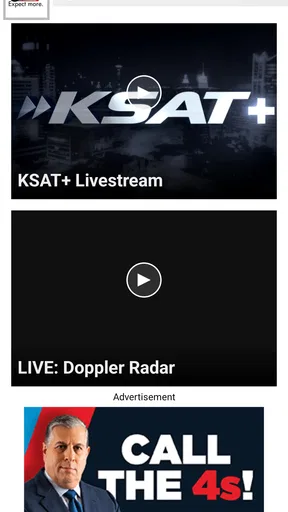
Yes, the KSAT 12 News app offers live streaming of their news broadcasts. Users can watch breaking news, live events, and regular news segments directly through the app, keeping them informed in real-time. This feature is particularly useful for staying updated on local and national news as it happens.
Can I customize the news alerts I receive through the KSAT 12 News app?
Absolutely! The KSAT 12 News app allows users to customize their news alerts. You can choose specific topics or categories, such as weather, traffic, sports, or breaking news, to receive notifications about. This ensures that you only receive updates that are relevant and important to you.
Is there a subscription fee or any hidden costs associated with the KSAT 12 News app?
No, the KSAT 12 News app is completely free to download and use. There are no subscription fees or hidden costs involved. However, the app may display advertisements, which help support the free access to the news content provided. Users can enjoy a broad range of features without any financial commitment.
How frequently is the content updated on the KSAT 12 News app?
The KSAT 12 News app is frequently updated to provide the most current news coverage. Updates occur throughout the day, ensuring that users have access to the latest information on local and national news stories. This includes breaking news alerts, weather updates, and live coverage of significant events.


